Submission Guide to Mill Levy Certification Form
Helpful Links for Submission:
- Adams County Certification of Mill Levies Landing Page: Access Landing Page
- Assessor Certification of Values
- DOLA – Colorado Local Governments (Site to refer to for DOLA local government ID, subdistrict ID, etc)
Helpful Hint
CREATE an account before you start.
Once you create an account within AccessGov you will be able to save your form (or multiple forms) in progress.
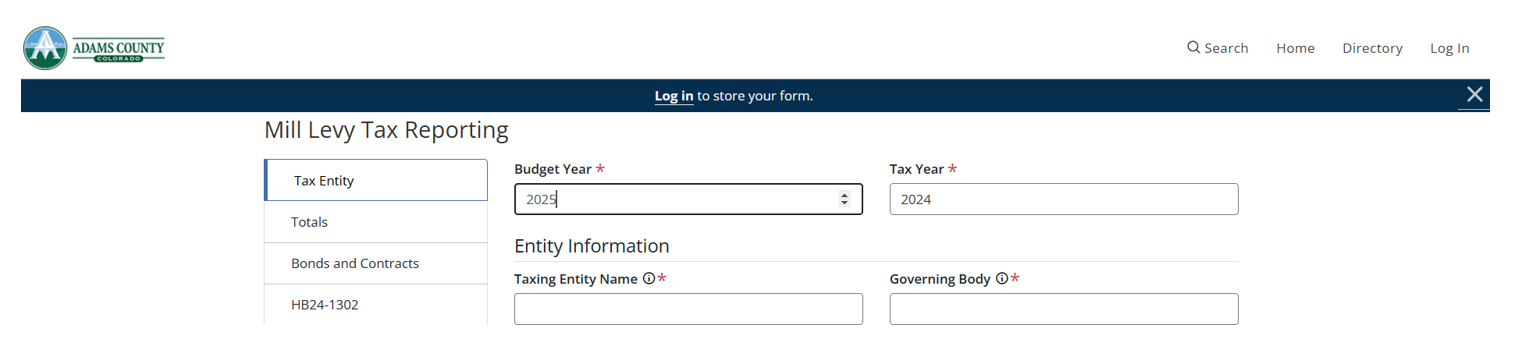
Go to upper right hand corner to select Log in to create your account.
Once account created and form in progress select save and exit at the bottom of any page.

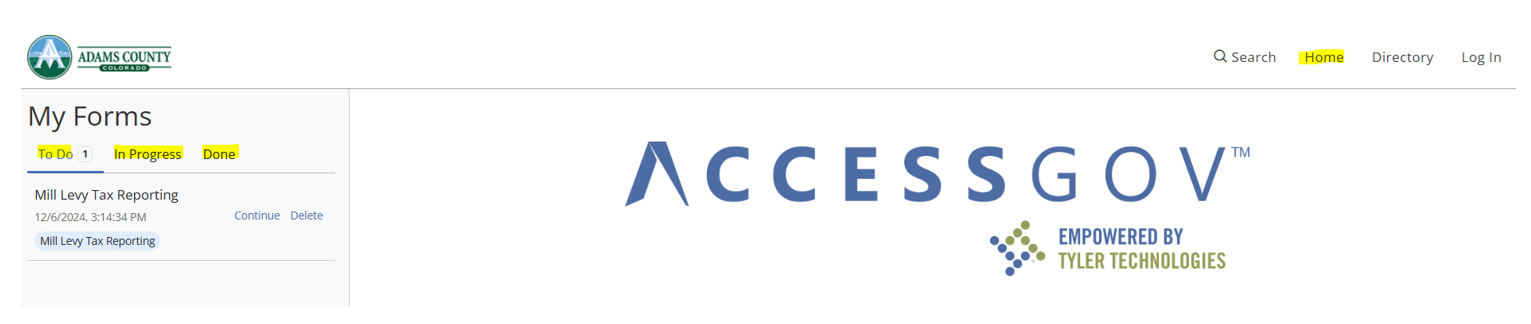
To access saved form select Home in the upper right corner. From there you will navigate to the left hand side of the screen to the ‘To Do’ section for saved forms not yet submitted. You will also be able to see submitted forms in the ‘Done’ section.
Submission Steps
- Access the Certification of Mill Levy form online through the Adams County Landing Page or through the following link: Complete Mill Levy Certification Form
- TAX ENTITY SECTION
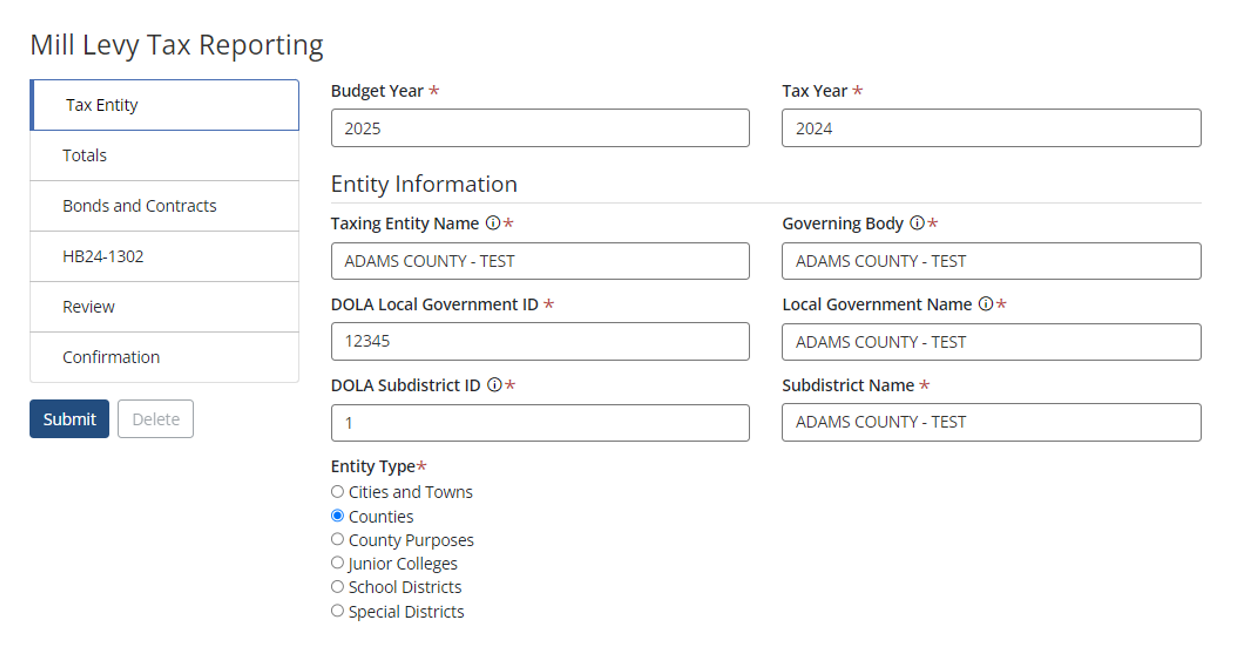
The tax entity section is information that would come directly from your DLG70.
- Budget Year / Tax Year Auto-populates with current submission year (this can be changed if necessary).
- Enter Your 5 DIGIT Local Government ID (ENTER PRECEEDING 0 BEFORE 4 DIGIT LOCAL GOVERNEMENT ID NUMBERS). If your number is not found please contact mmilllevy@adamscountyco.gov.
- Select corresponding Subdistrict ID.
- Enter your Governing Body.
- Local Government Name and Subdistrict Name Auto-Populates (change only if necessary).
Tax Entity Name, Governing Body, Local Government Name descriptions are as follows:
Taxing Entity—A jurisdiction authorized by law to impose ad valorem property taxes on taxable property located within its territorial limits. A taxing entity is also a geographic area formerly located within a taxing entity’s boundaries for which the county assessor certifies a valuation for assessment and which is responsible for payment of its share until retirement of financial obligations incurred by the taxing entity when the area was part of the taxing entity.
Governing Body—The board of county commissioners, the city council, the board of trustees, the board of directors, or the board of any other entity that is responsible for the certification of the taxing entity’s mill levy.
Local Government—The local government is the political subdivision under whose authority and within whose boundaries the taxing entity was created. The local government is authorized to levy property taxes on behalf of the taxing entity.
DOLA Local Government ID / Subdistrict ID accessed at: DOLA – Colorado Local Governments
NOTE: As in Sample Below the first 5 Digits is your DOLA Local Government ID (01001) and the digit after the dash is your Subdistrict ID (1). The subdistrict ID will not be greater than 2 digits. (Is 1 for most taxing entities)
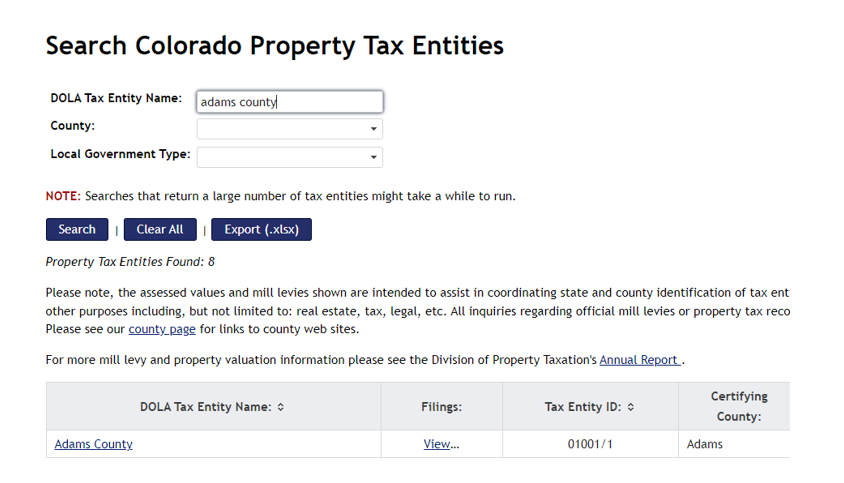
Select the correct entity type.
Cities and Towns, Counties, Junior Colleges, School Districts, Special Districts, County Purposes)
- Gross / Net Assessed Values Auto-Populate Based on Information from the Adams County Assessor.
- Certification of value letter received from the Adams County Assessor available at:
Assessor Certification of Values
- Certification of value letter received from the Adams County Assessor available at:
- Enter Your Contact Information (Name, Title, Email, Phone)
- Upload PDF of your completed DLG70 form ONLY.
Totals Section
Enter appropriate mills enter each category (General, Temporary, Etc)
Bonds/Contract Mills will be automatically calculated based on your entries within Bonds/Contracts section.
The revenues will automatically calculate.
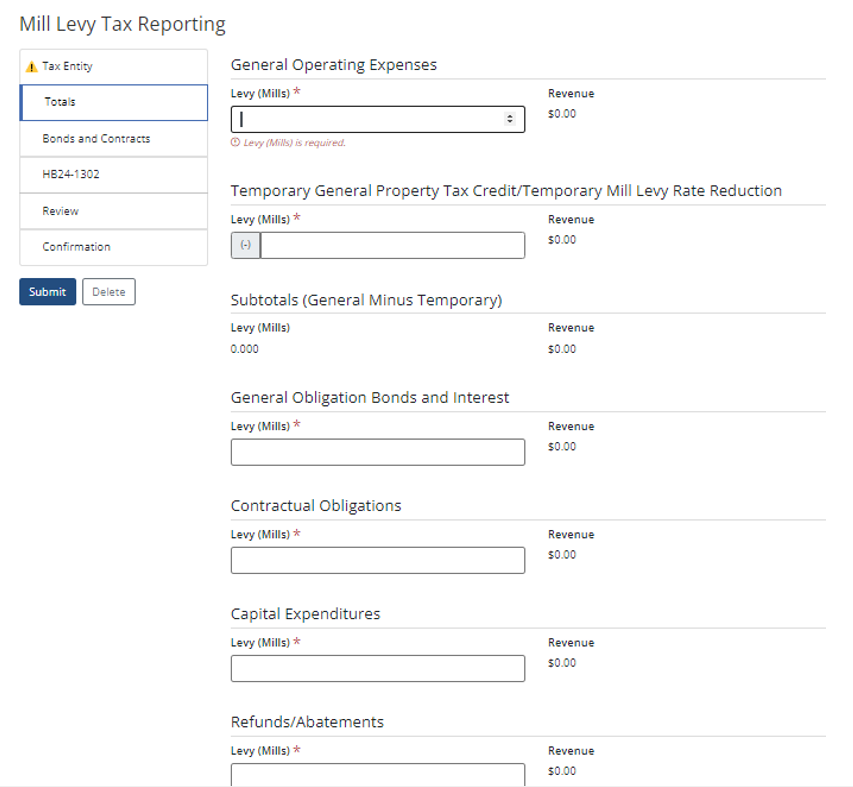
Bonds & Contracts
Select Yes / No if you have bonds or contracts.
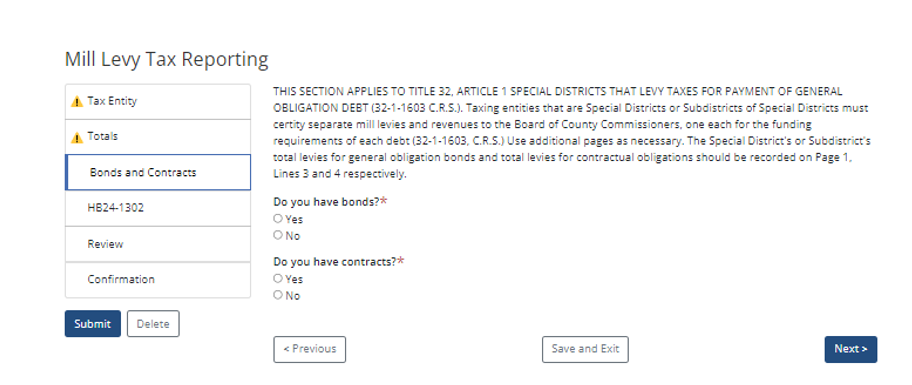
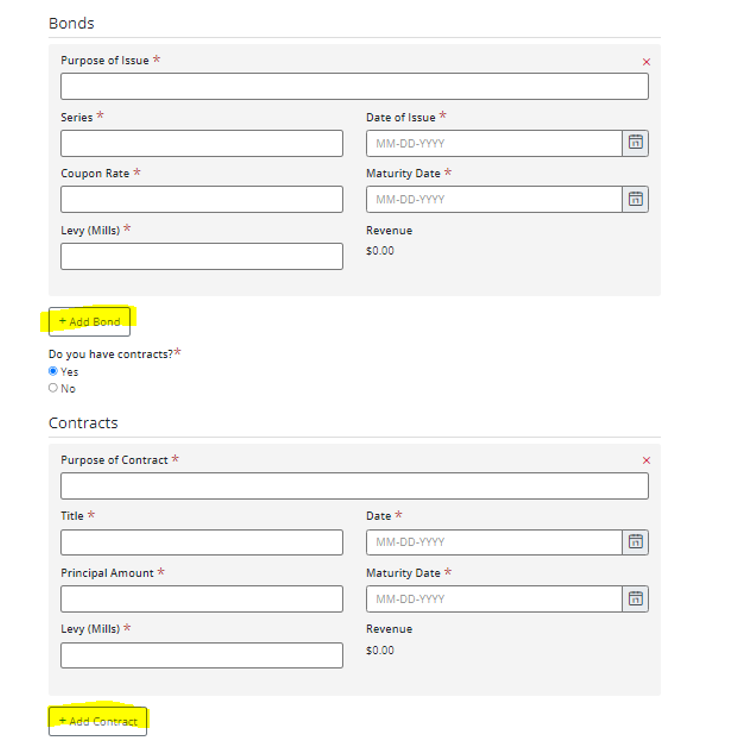
If Yes is selected, fill out corresponding information for EACH Bond or Contract. Select the (+ADD BOND) or (+ADD CONTRACT) as highlighted below for additional Bonds/Contracts.
HB24-1302 Section
For EACH Mill Levy Complete the Following Information. To add a Mill Levy Select the (+ ADD MILL LEVY) option highlighted below.
For information regarding these questions please see DOLA’s Local Government Guidance or Information provided below.
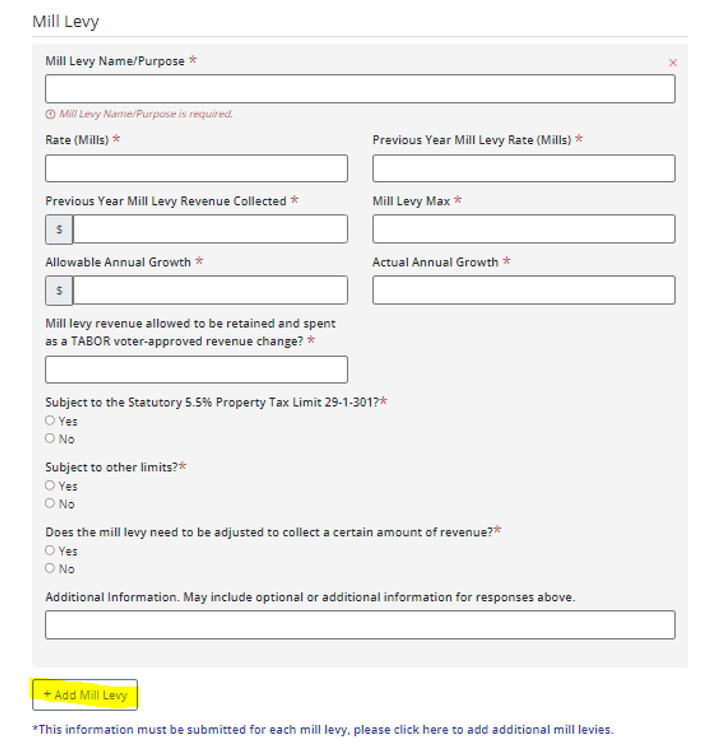
HB24-1302 requires local governments that levy property tax to provide the following information to counties when they certify mill levies by December 15 as part of the budget process.
- Mill levy name or purpose
- Local government taxing entities determine the number of mill levies and names for their mill levies (e.g. operating, debt, 2013 water bonds, 2009 recreation center mill levy). Local governments may have one or multiple mill levies.
- Mill Levy Rate (Mills for Budget Year 2025)
- Previous Year Mill Levy Rate (Mills for Budget Year 2024)
- Previous Year Mill Levy Revenue Collected ($)
- Recommend using either the 2024 estimated property tax revenue collected or 2024 budgeted property tax revenue based on certified mills and assessed value.
- Mill Levy Maximum (mills)
- Determine based on previous voter approval, most restrictive revenue limit (if applicable), and previous year mill levy which cannot usually be increased without voter approval.
- Allowable Annual Growth in Mill Levy Revenue ($)
- Calculate most restrictive revenue limit (if applicable)
- Actual Growth in Mill Levy Revenue ($)
- Difference between budgeted mill levy revenue for budget year 2025 and Previous Year Mill Levy Revenue Collected
- Is revenue from this mill levy allowed to be retained and spent as a voter-approved revenue change pursuant to section 20 (7)(b) of Article X of the State Constitution (TABOR)?
- Is revenue from this mill levy subject to the Statutory Property Tax (5.5%) Limit in 29-1-301 C.R.S.?
- Is revenue from this mill levy subject to any other limit on annual revenue growth enacted by the local government or another local government?
- Does the mill levy need to be adjusted or does a temporary mill levy reduction need to be used in order to collect a certain amount of revenue? If Yes, what is the amount?
- Other information
- At the local government’s discretion, include explanatory information for above questions or other information about the mill levy.
Information does not need to be provided for levies for the total amount of abatements and refunds certified by the County Assessor (abatement levies pursuant to 39-10-114(1)(a)(I)(B) C.R.S.).
In order to provide this information, local government staff may need to perform legal and election research. DOLA recommends reviewing the history of ballot questions about the local governments mill levy or revenue limits such as the Statutory Property Tax (5.5%) Limit, TABOR fiscal year spending limit, TABOR property tax revenue limit in addition to any specific local revenue limits that may apply. DOLA also recommends discussing the mill levy public information with the local government’s attorney. Local government staff, board members, in addition to former staff and board members may be able to provide historical information.
Below is a list of suggested resources that may help local government staff provide the required mill levy information.
- Previous year and historical mill levies
- Local government’s historic financial, budget, and election, tax records
- Some historical budgets and property tax information filed by local governments are available on DOLA’s Local Government Information System (opens in new window)
- The Division of Property Taxation’s Annual Reports (opens in new window) are also available going back to 1912.
- For information about whether a local government is subject to the Statutory Property Tax (5.5%) Limit in 29-1-301 C.R.S., review the Division of Local Government’s list of entities subject to the 5.5% limit (opens in new window).
- For information on locally enacted revenue limits, review governing documents such as board resolutions/ordinances, code and home-rule charter if applicable, and other policy documents that could discuss locally imposed revenue limits.
- Election results and ballot question history
- Local governments should retain election results and ballot questions indefinitely, but in case those records are not available:
- Contact the County Clerk in case the election was coordinated with the county and records were retained by the county.
- Contact DLG for a search of archived local government filings.
- Contact the local library to review newspaper archives around previous election days. Election notices and results may have been published in a local paper of record.
- If there is no history of ballot questions about the mill levy or revenue limits, the local government may need to assume that all statutory and constitutional revenue limits apply, such as the Statutory Property Tax (5.5%) Limit, TABOR fiscal year spending limit, and TABOR property tax revenue limit. In this case, local government staff should confer with the governing board and consult legal advice to determine which revenue limits apply to the local government.
- Local governments should retain election results and ballot questions indefinitely, but in case those records are not available:
Review All Submitted Information
Go Back to required tabs for any necessary changes.
Confirmation
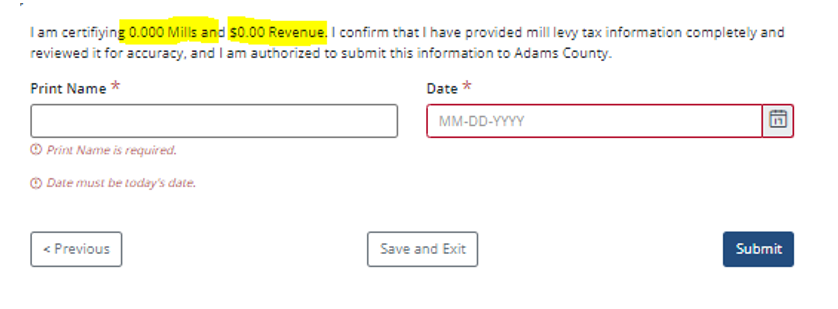
Confirm Mills and Revenue entered are correct; Enter Name and Date; SUBMIT.
You will then receive an email confirming your submission with a PDF version of what you submitted.